반응형
디스크 추가
VMware 에 가상 디스크 추가
Edit virtual machine settings


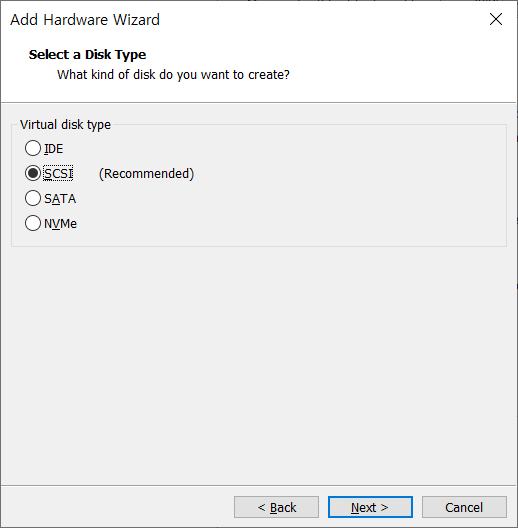
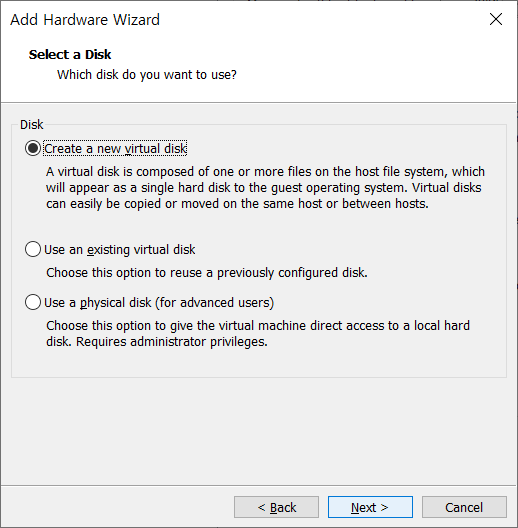
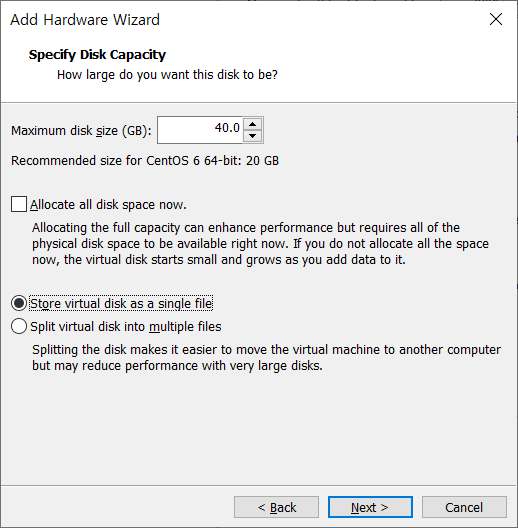


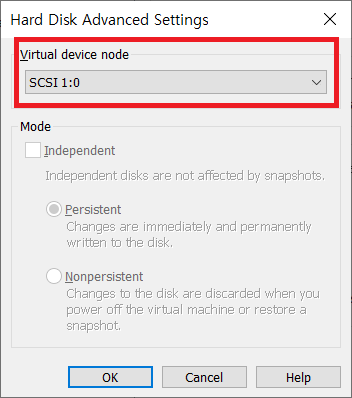
fdisk -l 명령어로 스토리지 확인
[root@host01 ~]# fdisk -l

Disk /dev/sda: 42.9 GB, 42949672960 bytes
255 heads, 63 sectors/track, 5221 cylinders
Units = cylinders of 16065 * 512 = 8225280 bytes
Sector size (logical/physical): 512 bytes / 512 bytes
I/O size (minimum/optimal): 512 bytes / 512 bytes
Disk identifier: 0x00030672

   Device Boot      Start         End      Blocks   Id  System
/dev/sda1   *           1         131     1048576   83  Linux
Partition 1 does not end on cylinder boundary.
/dev/sda2             131         784     5242880   82  Linux swap / Solaris
Partition 2 does not end on cylinder boundary.
/dev/sda3             784        5222    35650560   83  Linux

Disk /dev/sdb: 42.9 GB, 42949672960 bytes
255 heads, 63 sectors/track, 5221 cylinders
Units = cylinders of 16065 * 512 = 8225280 bytes
Sector size (logical/physical): 512 bytes / 512 bytes
I/O size (minimum/optimal): 512 bytes / 512 bytes
Disk identifier: 0x00000000
fdisk /dev/sdb 명령어로 파티션 추가
[root@host01 ~]# fdisk /dev/sdb
Device contains neither a valid DOS partition table, nor Sun, SGI or OSF disklabel
Building a new DOS disklabel with disk identifier 0x5e9dbb28.
Changes will remain in memory only, until you decide to write them.
After that, of course, the previous content won't be recoverable.
Warning: invalid flag 0x0000 of partition table 4 will be corrected by w(rite)
WARNING: DOS-compatible mode is deprecated. It's strongly recommended to
switch off the mode (command 'c') and change display units to
sectors (command 'u').
Command (m for help): n
Command action
e extended
p primary partition (1-4)
p
Partition number (1-4): 1
First cylinder (1-5221, default 1):
Using default value 1
Last cylinder, +cylinders or +size{K,M,G} (1-5221, default 5221):
Using default value 5221
Command (m for help): w
The partition table has been altered!
Calling ioctl() to re-read partition table.
Syncing disks.n
p
1
{enter}
{enter}
w
파티션 확인
[root@host01 ~]# fdisk -l

Disk /dev/sda: 42.9 GB, 42949672960 bytes
255 heads, 63 sectors/track, 5221 cylinders
Units = cylinders of 16065 * 512 = 8225280 bytes
Sector size (logical/physical): 512 bytes / 512 bytes
I/O size (minimum/optimal): 512 bytes / 512 bytes
Disk identifier: 0x00030672

   Device Boot      Start         End      Blocks   Id  System
/dev/sda1   *           1         131     1048576   83  Linux
Partition 1 does not end on cylinder boundary.
/dev/sda2             131         784     5242880   82  Linux swap / Solaris
Partition 2 does not end on cylinder boundary.
/dev/sda3             784        5222    35650560   83  Linux

Disk /dev/sdb: 42.9 GB, 42949672960 bytes
255 heads, 63 sectors/track, 5221 cylinders
Units = cylinders of 16065 * 512 = 8225280 bytes
Sector size (logical/physical): 512 bytes / 512 bytes
I/O size (minimum/optimal): 512 bytes / 512 bytes
Disk identifier: 0x5e9dbb28

   Device Boot      Start         End      Blocks   Id  System
/dev/sdb1               1        5221    41937651   83  Linux
ext4 형식으로 포맷
[root@host01 ~]#  mkfs.ext4 /dev/sdb1
mke2fs 1.41.12 (17-May-2010)
Filesystem label=
OS type: Linux
Block size=4096 (log=2)
Fragment size=4096 (log=2)
Stride=0 blocks, Stripe width=0 blocks
2621440 inodes, 10484412 blocks
524220 blocks (5.00%) reserved for the super user
First data block=0
Maximum filesystem blocks=4294967296
320 block groups
32768 blocks per group, 32768 fragments per group
8192 inodes per group
Superblock backups stored on blocks:
        32768, 98304, 163840, 229376, 294912, 819200, 884736, 1605632, 2654208,
        4096000, 7962624

Writing inode tables: done
Creating journal (32768 blocks): done
Writing superblocks and filesystem accounting information: done

This filesystem will be automatically checked every 38 mounts or
180 days, whichever comes first.  Use tune2fs -c or -i to override.
파티션 연결할 디렉토리 생성 후 마운트
[root@host01 ~]# mkdir /u01
[root@host01 ~]# mount /dev/sdb1 /u01
파티션 확인
[root@host01 ~]# df -k
Filesystem     1K-blocks   Used Available Use% Mounted on
/dev/sda3       34960064 781516  32396020   3% /
tmpfs             952580      0    952580   0% /dev/shm
/dev/sda1         999320  27032    919860   3% /boot
/dev/sdb1       41917172  32928  41884244   1% /u01
fstab 등록
# blkid로 sdb1의 UUID를 확인

[root@host01 ~]# blkid
/dev/sda1: UUID="b23604fa-6b4e-46e3-9247-e6ec303956ef" TYPE="ext4"
/dev/sda2: UUID="aeae071c-1060-4de6-8326-509d8ee639a5" TYPE="swap"
/dev/sda3: UUID="b27ca18e-53ff-4063-8f6b-c1cf0d5e62c9" TYPE="ext4"
/dev/sdb1: UUID="95e19532-5a09-4a8e-8257-d07fa85f3fac" TYPE="ext4"


# 아래 내용과 같이 UUID 추가하여 부팅시 자동으로 마운트 되도록 설정

[root@host01 ~]# cat /etc/fstab

UUID=b27ca18e-53ff-4063-8f6b-c1cf0d5e62c9 /                       ext4    defaults        1 1
UUID=b23604fa-6b4e-46e3-9247-e6ec303956ef /boot                   ext4    defaults        1 2
UUID=aeae071c-1060-4de6-8326-509d8ee639a5 swap                    swap    defaults        0 0
UUID=95e19532-5a09-4a8e-8257-d07fa85f3fac /u01                    ext4    defaults        0 0
반응형
'OS' 카테고리의 다른 글
| [Linux] Rocky Linux 8 LVM(Logical Volume Manager) 구성 (0) | 2025.01.08 |
|---|---|
| [OS] Upgrade CentOS 7 to CentOS 8 Linux (0) | 2025.01.07 |
| [Linux] sudo 특정 명령어 사용 시 권한 부여 (0) | 2023.12.14 |
| [LINUX] ssh 연결시 특정 유저만 비밀번호 계속 확인 (0) | 2023.09.11 |
| [Linux] CentOS 8 Yum 실행 시 No URLs in mirrorlist 오류 (0) | 2022.11.25 |
